
Back to work

Workflow tool

Lead Data Standardizer

A tool for getting vendor files ready for a marketing system, with fixed mappings where possible and a review step where things get ambiguous.

Google AI StudioUsed by colleaguesMarketing data quality

Upload

It starts with the vendor’s raw CSV. Three tabs hold the steps: data and mapping, the picklist, and review.

Full size image of the upload screen
Lead Standardizer’s upload screen: an Upload Vendor CSV panel with a Select CSV File button, under tabs for Data & Mapping, Picklist Info and Review.

Picklist

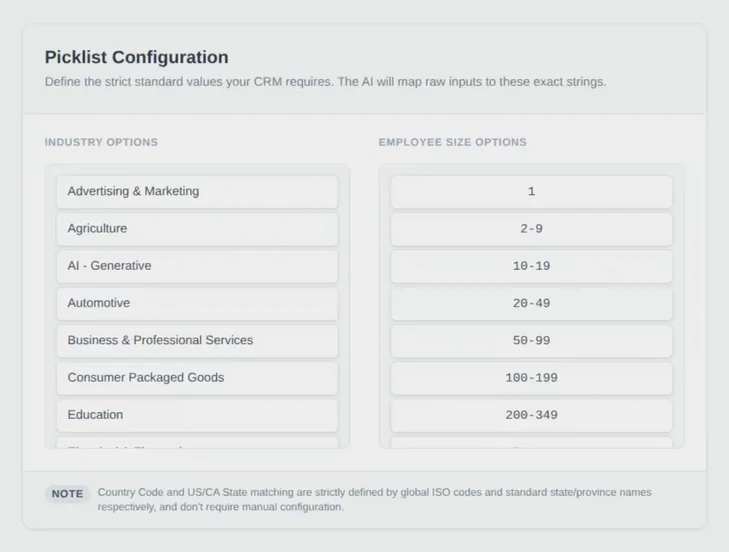
The exact values the CRM accepts, which industry and employee size map to. Countries and US and Canadian states match against ISO codes and standard names instead.

Full size image of the picklist screen
The Picklist Configuration panel. Industry options such as Advertising & Marketing and Agriculture sit beside employee-size options from 1 to 200-349, with a note that country and state matching use ISO codes and standard names.

Review

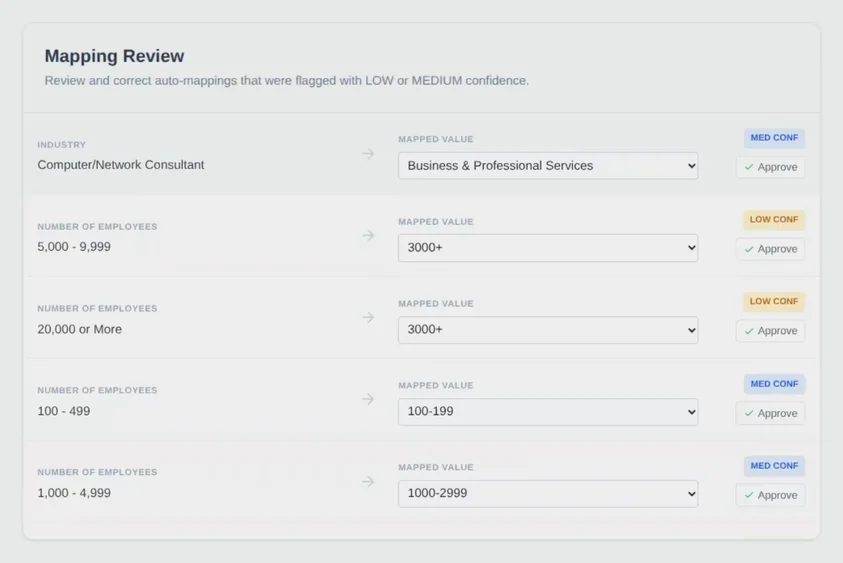
Mappings flagged with low or medium confidence, each beside its original value. A person approves the suggestion or picks another value.

Full size image of the review screen
The Mapping Review panel. Five flagged rows each show an original vendor value, such as Computer/Network Consultant or 5,000 - 9,999 employees, an arrow to the mapped value in a drop-down, a medium or low confidence label, and an Approve button.

Screens from July 2026. The preview and export steps aren’t shown, because those screens hold real contact records.

A familiar import problem

A vendor file might say “USA,” “Software & IT,” or “201–500 people.” The destination system expects its own countries, industries, and employee-size values. Getting a plausible answer is only part of the job. The mapping also needs to fit the system and remain inspectable.

Building a workflow around the prompt

I built Lead Data Standardizer in Google AI Studio to close that gap. It brings upload, preview, picklist configuration, mapping review, and a clean-CSV export into one interface.

Country and state values use fixed matching. Industry and employee-size values map to a constrained picklist, and uncertain mappings go to a person for review.

Rules

Known transformations

Use fixed mappings for unambiguous values and enforce the allowed vocabulary.

AI

Ambiguous inputs

Propose an interpretation when the input requires more than a lookup.

People

Consequential judgment

Show original and proposed values together so a reviewer can make the call.

Making room for review

A confidence score is useful only if someone can act on it. A review queue, visible source values, and explicit approval controls give uncertainty somewhere to go.

Can a person tell whether the proposed mapping is right?

Where it stands

I shared the tool with colleagues, and they used it to get vendor lists ready for upload. By my estimate, it saved roughly 30–45 minutes of manual work on each list upload. It takes over the lookups and picklist matching that shouldn’t have been a person’s job in the first place, and leaves people only the calls that need judgment.

Related field note

Where rules end and review begins

Read the note